Description
WP Plugin Control Center
Includes:
Licensed plugin ZIP access
Up to 3 website activations
Full plugin feature access included in your master ZIP
Plugin control dashboard included in the plugin
Plugin organization tools included in the plugin
Plugin health check tools if included
Safer plugin upload/activation tools if included
Plugin update visibility if included
Rollback/safety tools if included
Malware/vulnerability lookup tools if included
Client/plugin reporting tools if included
Updates while license is active
Standard support
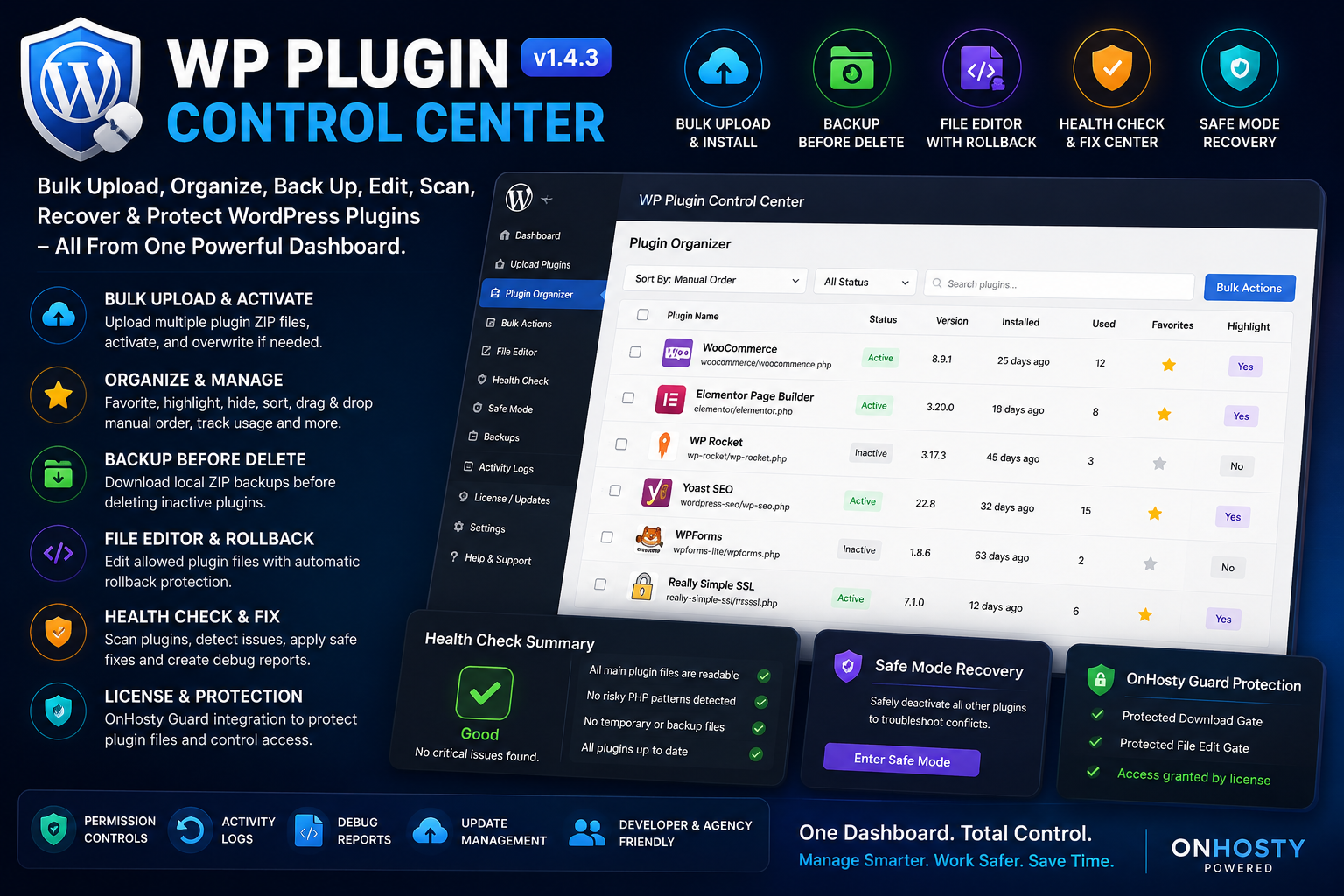
Bulk upload, organize, back up, edit, scan, recover, and manage WordPress plugins from one powerful admin control center.
WP Plugin Control Center gives WordPress site owners, developers, agencies, and plugin sellers a cleaner way to manage installed plugins without jumping between multiple screens. Upload multiple plugin ZIP files at once, activate them, organize your plugin list, favorite important tools, highlight key plugins, download ZIP backups, edit allowed plugin files with rollback protection, run health checks, create debug reports, and connect license/update delivery through OnHosty Guard.
This plugin is built for WordPress admins who manage more than a few plugins and want better control, safer recovery options, cleaner organization, and stronger protection around plugin files.
Turn Your WordPress Plugins Page Into a Real Control Center
The default WordPress plugin screen works for basic activation and updates, but it can feel limited when your site has many tools installed. WP Plugin Control Center adds a dedicated management dashboard where admins can sort, organize, protect, inspect, and recover plugin setups faster.
Use it to manage client sites, developer test sites, plugin shops, marketplace builds, OnHosty product systems, or any WordPress site that needs better plugin control.
Main Features
- Bulk upload multiple WordPress plugin ZIP files at once
- Optionally activate plugins after successful upload
- Optionally overwrite existing plugin folders for updates/reinstalls
- Automatically add newly uploaded plugins to Favorites
- View bulk upload results with install status, activation status, plugin file, and version
- Organize installed plugins with a dedicated control center dashboard
- Drag and drop plugins into a custom manual order
- Sort plugins by manual order, favorites, most used, highlighted, or A-Z
- Filter recently uploaded or installed plugins by 7 days, 10 days, or custom timeframe
- Favorite important plugins
- Highlight key plugins so they stand out
- Hide plugins from the organizer and restore hidden plugins later
- Track plugin usage with manual “mark used” counts
- Show installed plugin version numbers
- Show active/inactive status
- Show installed age and inactive age
- Run bulk actions across selected plugins
Bulk Plugin Actions
WP Plugin Control Center makes plugin management faster with bulk controls.
Admins can select multiple plugins and:
- Add to Favorites
- Remove from Favorites
- Highlight plugins
- Remove highlights
- Hide plugins from the organizer
- Restore hidden plugins
- Mark plugins as used
- Reset usage counts
- Deactivate selected plugins
- Download selected plugin ZIP backups
- Delete selected inactive plugins
Active plugins are skipped during delete, and the manager protects itself from self-deactivation and self-delete from the organizer.
Local ZIP Backup Before Delete
Before deleting plugins, admins can download local ZIP backups directly to their computer. This gives site owners a safer workflow when cleaning up inactive plugins, testing plugin changes, or removing old tools.
Bulk delete includes a backup confirmation step, and single delete uses a confirmation screen that encourages downloading a local backup first.
Plugin File Editor With Rollback Protection
WP Plugin Control Center includes an admin file editor for allowed plugin files. Before saving changes, the plugin can create rollback snapshots so the previous version can be restored if a file edit causes problems.
Supported editable file types include common plugin development files such as PHP, JS, CSS, TXT, MD, JSON, HTML, XML, YAML, PO, and POT files.
Rollback snapshots help admins recover from accidental edits, broken code, or quick testing mistakes.
Health Check + Fix Center
The built-in Health Check + Fix Center helps admins review plugin condition, run safe fixes, and create debug reports.
Health tools include:
- Plugin health summary
- Deep plugin scan
- Version display
- Update warning detection
- Inactive plugin age warning
- Main plugin file readability check
- Missing readme.txt detection
- Missing ABSPATH direct-access guard detection
- Temporary/backup file detection
- Risky PHP pattern detection
- Safe fix buttons
- Debug report download
- PHP lint/debug report support where the server allows it
Safe fixes can create starter readme files, add ABSPATH guards, clean temporary files, refresh update checks, and create debug reports. File-writing fixes create rollback snapshots before changes are applied.
Safe Mode Recovery
Plugin conflicts can break a WordPress admin experience fast. Safe Mode Recovery gives admins a recovery workflow that stores the current active plugin list, deactivates every other active plugin except WP Plugin Control Center, and then allows the previous active plugin list to be restored when the site is stable.
This is useful for troubleshooting plugin conflicts, failed updates, broken admin screens, and compatibility testing.
Activity Logs
WP Plugin Control Center logs important plugin management actions so admins can review what happened later.
Tracked activity can include uploads, downloads, edits, rollbacks, deletes, safe mode actions, permission changes, health fixes, debug report creation, and license checks.
Admin Permission Controls
Site owners can choose which WordPress capability is required for each power feature.
Permission controls are available for:
- Bulk upload/install plugins
- Organize, favorite, highlight, and deactivate plugins
- Download local plugin ZIP backups
- Edit plugin files and restore rollbacks
- Delete inactive plugins
- View and clear activity logs
- Change permission settings
- Use safe mode recovery
- Manage license/update settings
- Run health fixes and debug reports
This helps site owners keep powerful actions limited to trusted admins.
OnHosty Protected Plugin Gates
WP Plugin Control Center includes OnHosty protected plugin detection and Guard-based access gates.
OnHosty-branded or protected plugins are locked by default from unauthorized ZIP download and plugin file editing unless Guard explicitly grants protected download access or protected developer edit access.
This helps prevent protected OnHosty plugin files from being downloaded, copied, rewritten, manipulated, or edited without the correct permission.
License and Update Delivery Ready
The plugin includes a customer-facing License/Updates screen where customers can connect their license key and license email.
The license panel can show:
- Connected Guard server
- Licensed product
- Masked license key
- Plan
- Expiration or renewal date
- Activation count
- Update status
- Licensed email
- OnHosty File Edit Gate status
- OnHosty Download Gate status
Customers can save and activate a license, refresh license status, and deactivate the license on the current site.
Built for Site Owners, Developers, Agencies, and Plugin Sellers
WP Plugin Control Center is useful for anyone who manages WordPress plugins regularly.
Perfect For:
- WordPress site owners with many plugins
- Developers testing plugin builds
- Agencies managing client websites
- WooCommerce store owners using many tools
- Plugin sellers who need license/update delivery
- OnHosty product owners protecting plugin files
- Admins who want rollback and safer recovery options
- Anyone cleaning up old, inactive, or unused plugins
Main Benefits
- Save Time: Upload, activate, organize, and manage plugins faster.
- Stay Organized: Favorite, highlight, hide, sort, and manually arrange plugins.
- Reduce Risk: Use rollback snapshots before plugin file edits.
- Backup Before Delete: Download local ZIP backups before removing inactive plugins.
- Recover Faster: Use Safe Mode Recovery to troubleshoot plugin conflicts.
- Debug Smarter: Run health checks, safe fixes, scans, and downloadable debug reports.
- Protect OnHosty Plugins: Lock protected plugin downloads and file edits unless Guard grants access.
- Sell With Licensing: Connect license keys, customer email, updates, plan status, expiration, and activation tracking.
Why This Plugin Matters
A WordPress site can quickly become hard to manage when it has dozens of plugins, inactive tools, test builds, custom add-ons, and client-specific features. WP Plugin Control Center gives admins a more professional way to keep plugins organized, safer to edit, easier to back up, faster to inspect, and easier to recover.
Upload plugins. Organize your stack. Back up before deleting. Edit with rollback. Run health checks. Recover from conflicts. Protect OnHosty plugin files. Manage licenses and updates from one control center.

Reviews
There are no reviews yet.