Description
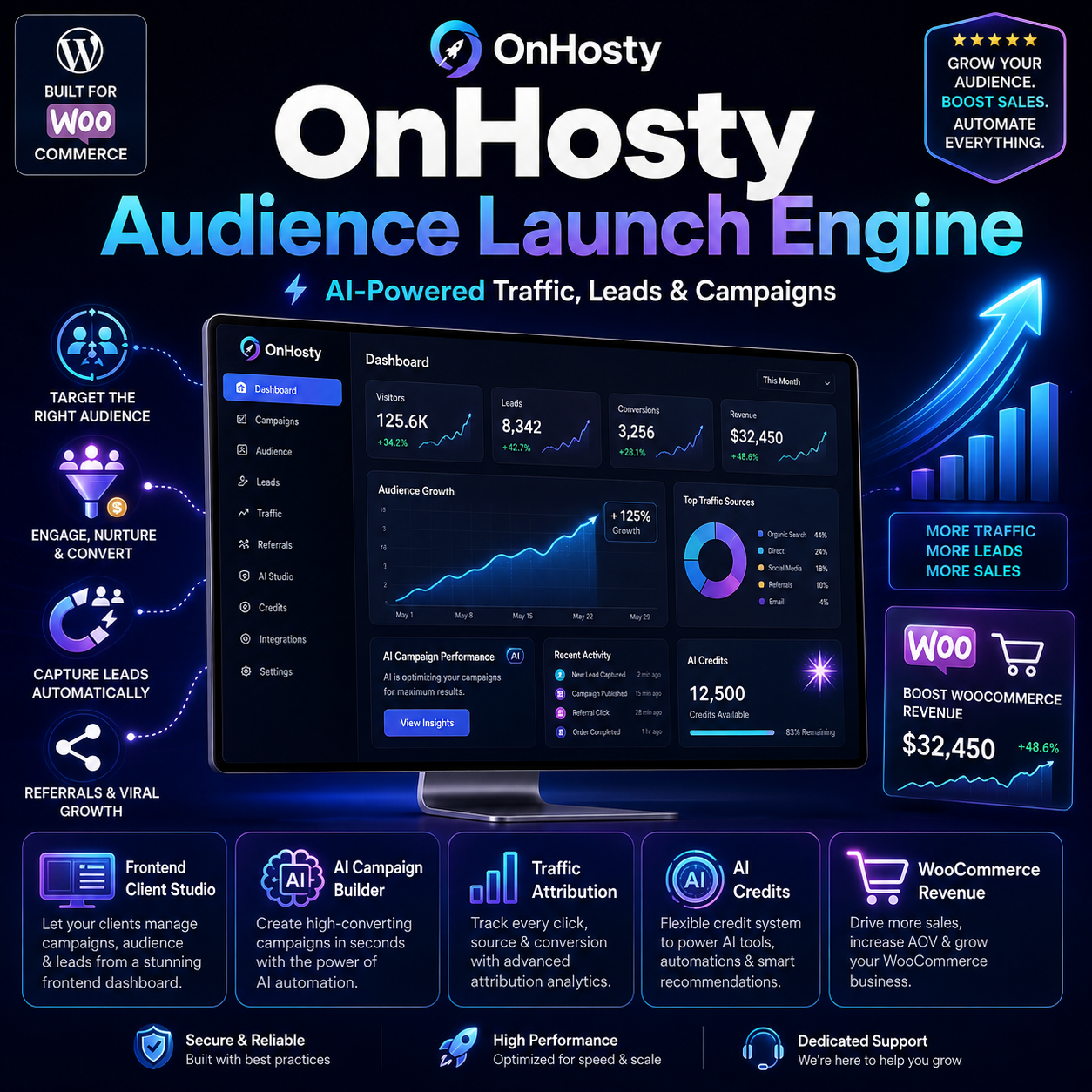
OnHosty Audience Launch Engine
Find Your Audience. Launch Your Campaign. Build Your Traffic.
Turn WordPress into a powerful audience targeting, campaign creation, lead generation, traffic attribution, AI marketing, and conversion tracking platform.
OnHosty Audience Launch Engine gives clients a professional frontend workspace for creating campaigns designed around a specific audience, offer, business goal, location, and marketing channel—without requiring normal clients to work inside the WordPress admin dashboard.
Whether you’re promoting a product, service, online business, WooCommerce store, affiliate offer, local company, creator brand, reseller business, or subscription service, Audience Launch Engine gives you the tools to build and measure the entire customer journey.
🚀 Launch an Entire Audience Campaign With AI
Instead of creating every piece of a campaign manually, clients can use the Launch My Audience Campaign system.
Enter information such as:
- Business or project
- Target audience
- Customer problem
- Product or service
- Offer
- Campaign goal
- Location
- Marketing budget
- Preferred traffic channels
AI can then help generate a complete campaign framework including:
- Campaign title
- Target audience profile
- Audience pain points
- Landing-page copy
- Headline variations
- Call-to-action variations
- Lead magnet ideas
- Conversion funnel
- Social media promotional content
- Email follow-up sequence
- Suggested keywords
- Recommended traffic channels
- Conversion goal
Generated content remains editable before publishing.
Professional Frontend Client Studio
Give customers access to a clean frontend marketing workspace instead of sending them into wp-admin.
The client dashboard can include:
Overview • Launch • Campaigns • Editor • Traffic • Funnel • Leads • AI & Credits
Clients can manage their own campaigns, leads, traffic data, AI settings, and campaign performance from one centralized interface.
🎯 Targeted Landing Page Campaigns
Create focused campaigns for specific audiences instead of sending every visitor to the same generic website page.
Build landing pages around:
- Audience type
- Customer problem
- Product
- Service
- Location
- Promotion
- Referral campaign
- Lead magnet
- Marketing channel
Campaign pages can include:
- Custom headlines
- Hero messaging
- Calls to action
- Lead forms
- Quizzes
- Product recommendations
- Referral links
- Promotional offers
- Conversion tracking
🧠 AI-Powered Audience Marketing
Clients can use artificial intelligence to assist with campaign creation and improvement.
AI can help generate:
- Marketing angles
- Audience descriptions
- Campaign copy
- Headlines
- CTAs
- Lead magnets
- Email sequences
- Social media content
- Funnel recommendations
- Keywords
- Campaign ideas
The system is designed to help clients create stronger marketing campaigns faster—not promise automatic rankings, traffic, or sales.
🔑 Bring Your Own OpenAI API Key
Clients can connect their own OpenAI API key when permitted by the administrator.
This allows users to pay OpenAI directly for their own AI usage while continuing to use the Audience Launch Engine frontend.
BYOK usage does not consume OnHosty AI credits.
API requests are routed through the WordPress server rather than exposing stored keys directly through frontend JavaScript.
⚡ Optional OnHosty AI Fallback
Clients who do not want to configure their own AI account can use OnHosty AI, when enabled by the site administrator.
OnHosty AI can operate using a credit-based usage system.
Clients can also choose:
Use my OpenAI key first → Automatically fall back to OnHosty AI if my key fails.
Fallback usage can consume the client’s available OnHosty AI credits.
💳 Built-In AI Credit System
Create your own AI usage economy directly inside WordPress.
Administrators can configure:
- Monthly included credits
- Role-based AI credits
- Purchased credits
- Bonus credits
- AI action costs
- Monthly request limits
- Maximum output allowances
- Individual customer overrides
Clients can view their available AI balance and usage history from the frontend dashboard.
Sell Additional AI Credits With WooCommerce
Create WooCommerce products that award AI credits after purchase.
Examples:
100 AI Credits
500 AI Credits
2,000 AI Credits
The administrator determines how many credits each eligible WooCommerce product awards.
This creates an additional monetization opportunity for websites offering AI-powered services.
📊 Traffic Attribution Center
Knowing that a campaign received visitors is useful.
Knowing where those visitors came from and whether they purchased is far more valuable.
Audience Launch Engine can track campaign traffic sources such as:
- TikTok
- YouTube
- Email campaigns
- QR codes
- Printed materials
- Referral links
- Affiliate links
- Custom sources
Generate dedicated tracking links containing:
- UTM Source
- UTM Medium
- UTM Campaign
- Referral information
- Campaign attribution
Clients can see which channels are actually producing results.
💰 WooCommerce Revenue Attribution
Connect campaign activity with WooCommerce purchases.
Track information such as:
- Campaign responsible for the conversion
- Traffic source
- Referral source
- UTM campaign
- WooCommerce order
- Order revenue
- Currency
- Conversion totals
Instead of only seeing:
2,000 visits
clients can potentially see campaign performance such as:
2,000 Visitors
140 Leads
24 Customers
$3,400 Attributed Revenue
This makes it much easier to determine which marketing efforts are contributing to revenue.
🔄 Visual Conversion Funnel
Track visitors through the marketing journey:
Visitors → Engagement → Leads → CTA Clicks → Customers
The Funnel Center helps clients understand where visitors are converting and where they may be dropping out.
Campaign funnel information can include:
- Lead magnet
- Conversion objective
- AI-generated funnel plan
- Social marketing plan
- Follow-up emails
- Suggested keywords
- Recommended traffic sources
📧 Lead Generation & Management
Capture leads directly from campaigns.
Lead tools can include:
- Name
- Email address
- Campaign source
- Referral information
- UTM information
- Conversion source
- Campaign association
- CSV exporting when permitted
Administrators decide which user roles are allowed to view or export lead information.
🎁 Lead Magnets
Create campaigns designed around incentives such as:
- Free guides
- Checklists
- Reports
- Coupons
- Recommendations
- Quizzes
- Business assessments
- Templates
- Downloads
- Personalized results
Use lead magnets to give visitors a reason to engage rather than simply displaying an advertisement.
❓ Interactive Audience Quizzes
Create interactive campaign experiences that help visitors identify the product, service, plan, or business opportunity most relevant to them.
For example:
“What Online Business Should You Start?”
The visitor answers several questions and receives a personalized recommendation.
The result can then direct the visitor toward:
- A product
- Service
- Membership
- WooCommerce checkout
- Registration
- Contact form
- Lead capture
- Referral opportunity
🔗 Referral Campaign System
Turn visitors and customers into additional traffic sources.
Campaigns can generate referral links that help track:
- Referral visits
- Leads
- CTA clicks
- Conversions
- Campaign performance
Use referrals for:
- Customer incentives
- Affiliates
- Resellers
- Promotional partners
- Social campaigns
- Word-of-mouth campaigns
🧪 A/B Marketing Tests
Test different campaign messaging instead of guessing.
Create variations for:
- Headlines
- Calls to action
- Offers
- Campaign messaging
Compare engagement and conversion results to determine which messaging is performing better.
📋 Clone Successful Campaigns
Found a campaign that works?
Clone it instead of starting over.
Duplicate a campaign and change:
- Audience
- City
- Offer
- Product
- Traffic source
- CTA
- Promotion
The original campaign remains intact while the duplicate can be modified and tested separately.
🛒 WooCommerce Integration
Audience Launch Engine works with WooCommerce-powered marketing workflows.
Use campaign tracking with:
- Products
- Orders
- Revenue
- Conversion attribution
- AI credit products
- Product recommendations
- Campaign CTAs
This makes the plugin especially useful for online stores, service marketplaces, reseller platforms, and membership businesses.
👥 Powerful Administrator Role Controls
Administrators remain in control.
Configure permissions and limits by WordPress role including:
- Frontend Studio access
- Number of campaigns
- Campaign publishing
- Monthly AI requests
- Monthly AI credits
- Maximum AI output
- BYOK availability
- OnHosty AI availability
- Traffic Center access
- Funnel access
- Lead access
- Lead exports
- Campaign cloning
- Launch Wizard access
Use 0 for unlimited on supported allowance settings.
🎛 Individual User Overrides
Not every customer needs the same limits.
Administrators can provide specific customers with different allowances without creating an entirely new WordPress role.
Perfect for:
- VIP customers
- Founding clients
- Enterprise accounts
- Temporary promotions
- Trial upgrades
- Bonus AI allowances
- Custom service agreements
📱 Responsive Client Experience
The Audience Launch Engine frontend studio is designed for modern client usage across supported desktop, tablet, and mobile layouts.
Clients can manage marketing activity while administrators retain control of the platform behind the scenes.
Ideal For
OnHosty Audience Launch Engine can be used by:
- Small businesses
- Online entrepreneurs
- WordPress agencies
- Digital marketers
- Creators
- Affiliates
- WooCommerce stores
- Hosting resellers
- Plugin resellers
- SaaS businesses
- Local businesses
- Consultants
- Coaches
- Service providers
- Marketing agencies
- Membership websites
Build More Than a Landing Page
Most campaign tools stop after creating content.
Audience Launch Engine connects the larger growth process:
Audience → Campaign → Traffic → Lead → Funnel → Customer → Revenue → Analytics
Use one frontend platform to help create campaigns, track where visitors came from, capture prospects, measure conversions, manage AI usage, and identify the marketing efforts contributing to actual results.
OnHosty Audience Launch Engine
Find your audience. Build your campaign. Capture leads. Track conversions. Grow smarter.
Reviews
There are no reviews yet.